

This year has seen a Cambrian explosion of inference engines, partly because state-of-the-art LLMs have become remarkably effective at writing shaders and running shader experiments. That means more combinations and more underlying inference engines to test whenever new hardware comes out.
When Apple introduced the new Mac Studio with M5 Ultra and Mac mini with M6, Draw Things was featured, and Apple claimed up to 4.5× peak GPU compute for AI on M5 Ultra compared with M3 Ultra. In the past few days since we got our hands on the new machines, we have been busy evaluating these claims against a new crop of inference engines while improving our own at the same time.
This work is important because we want to put other inference engines in their best light while keeping the playing field level.
What is in, what is out
Quantization can be lossy. But image and video generation are largely compute-bound, so reducing memory bandwidth alone does not buy us much. What matters more is being able to use the new low-precision arithmetic units on each chip. If quantization unlocks those units with acceptable quality loss, it should be fair game. Quantization is in.
Many sparse attention techniques can be retrofitted onto diffusion models that use dense attention. However, there are so many knobs that it is almost impossible to balance the computation fairly across implementations, making an apples-to-apples comparison difficult. We are going to turn off all sparse attention options.
Under the same premise, techniques such as diffusing at a lower resolution before upscaling for later steps (which can broadly be viewed as a variant of sparse attention), or reusing partial results across steps (TeaCache, First Block Cache, TaylorSeer, etc.), are out. On the other hand, the KV cache technique is exact, so it is in.
A subset of approximate attention techniques, namely SageAttention and Metal Quantized Attention, is still in, as these techniques mainly introduce quantization error, which we already accepted in the discussion above.
Apple Neural Engine (ANE), AMX (anyone?), GPU, and Neural Accelerators are all fair game. If you find a creative way to use them in combination that delivers the best results, more power to you. Different arithmetic units will produce different results due to relaxed math, which we broadly treat as accepted numerical errors.
Model loading time was excluded whenever possible. For Draw Things, that is not possible on low-RAM devices, so model loading time was included for those devices.
These choices are subjective. They may put Draw Things at an unfair advantage, as can happen with any first-party benchmark. But hopefully we have documented our choices extensively so readers can understand the trade-offs and challenge our assumptions.
Results
We compared three recent community favorites: Krea 2 Turbo, Qwen Image 2.1 Turbo, and MiniMax H3. For the image models, we now compare at higher resolutions, since both are capable of generating images up to 2048×2048. To finish video generation in a reasonable amount of time, we chose 1024×512 resolution and 20 steps.
For Draw Things, we used the 8-bit S variants of the models unless otherwise specified.
For inference engines, we compared against mflux, mlx-serve, vpipe, which are either well-established or made the most noise in recent times.
M3 Ultra
On M3 Ultra (60c, 96GiB), Draw Things automatically enables Apple Neural Engine + GPU mode. We manually disabled high-resolution preview, which competes for access to the Apple Neural Engine.
We searched for the best configurations for mflux, mlx-serve, and vpipe, and arrived at the following:
mflux: BF16 weights, GPU only.
mlx-serve: affine Q8 weights, GPU only.
vpipe, Qwen Image 2.1 Turbo and Krea 2 Turbo at 1024x1024: BF16 weights, GPU only.
vpipe, others: BF16 weights, GPU and FP16 ANE at roughly 50% / 50% split.
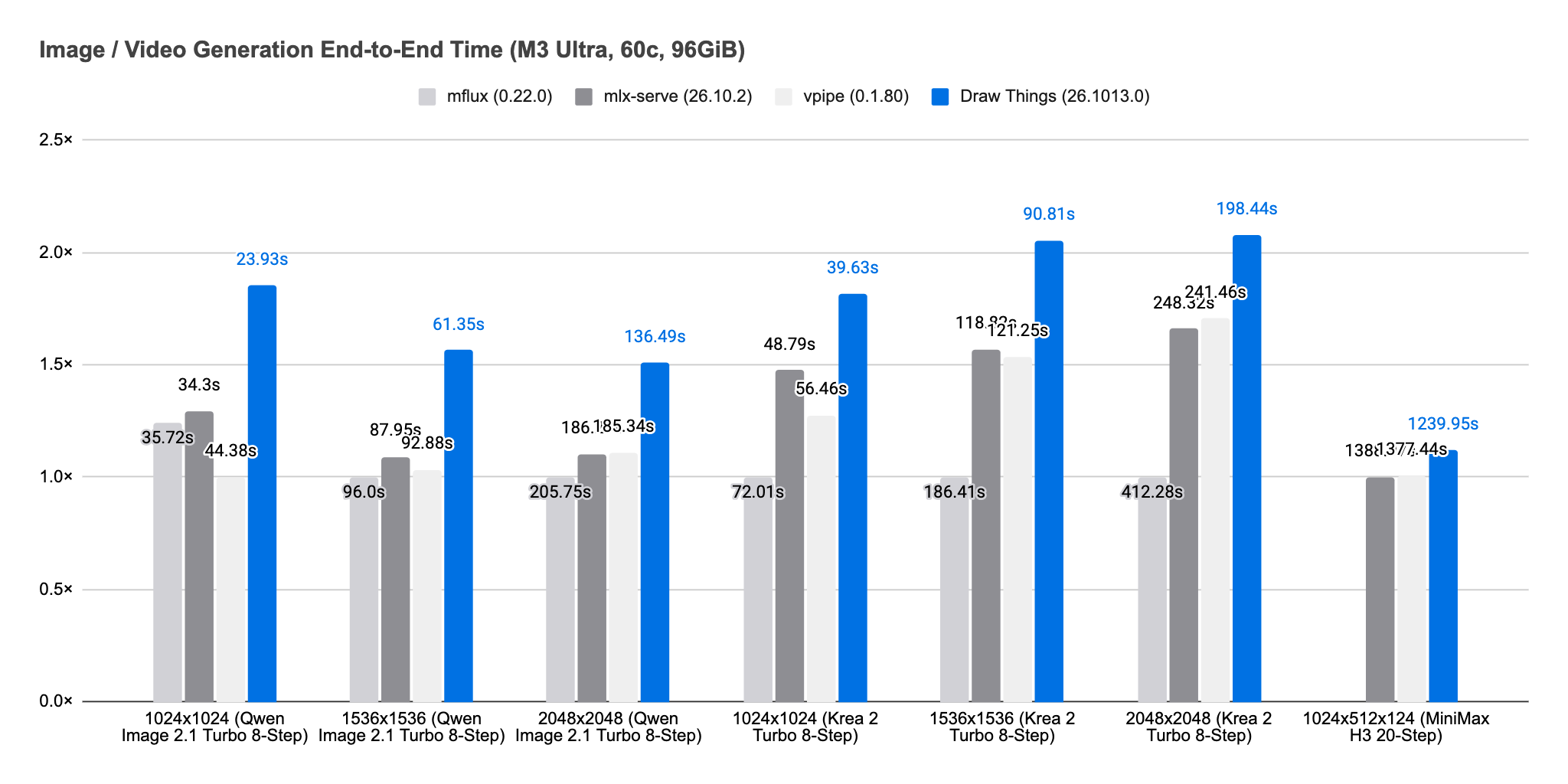
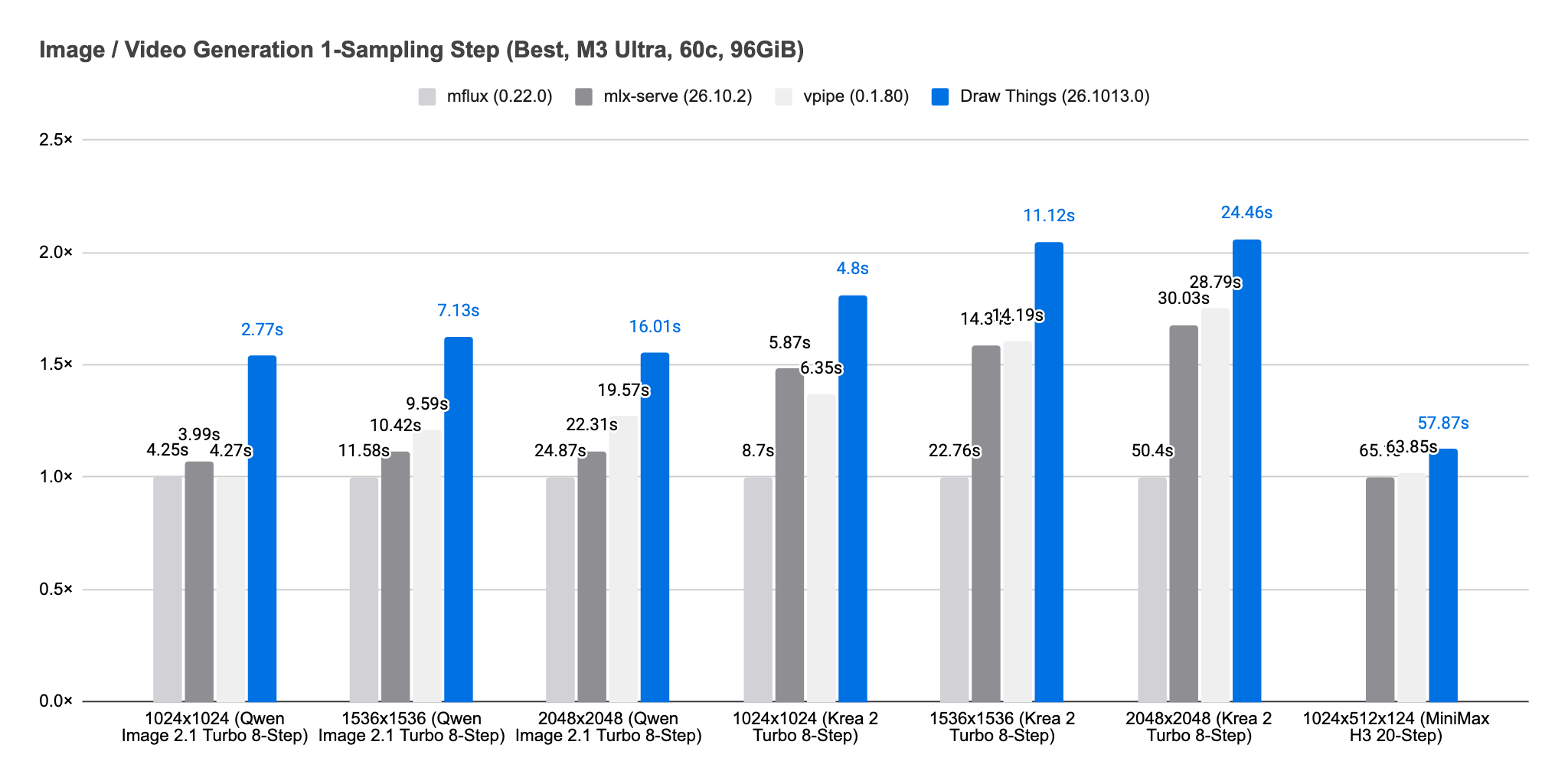
On this particular device, Draw Things is 1.11× to 1.43× as fast as the fastest competing inference engine.
M4 Pro
On M4 Pro (20c, 24GiB), Draw Things automatically enables Apple Neural Engine + GPU mode. We manually disabled high-resolution preview, which competes for access to the Apple Neural Engine.
We also searched for the best configurations for mflux, mlx-serve, and vpipe.
mflux: Q8 weights, GPU only.
mlx-serve, Krea 2 Turbo at 1024x1024 and 2048x2048: Q4 weights, ANE + GPU.
mlx-serve, others: Q4 weights, GPU only.
vpipe: Q8 weights, ANE + GPU.
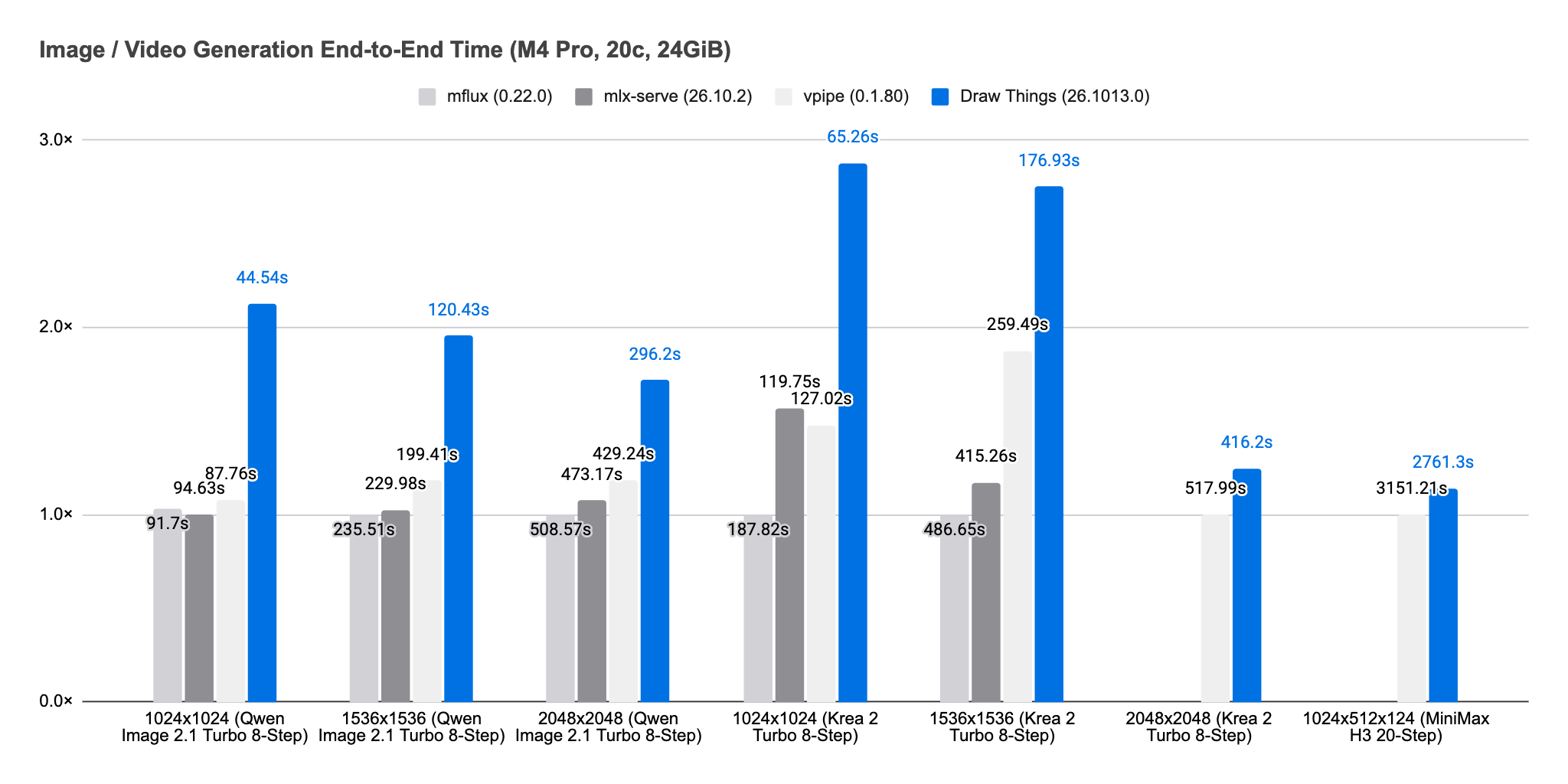
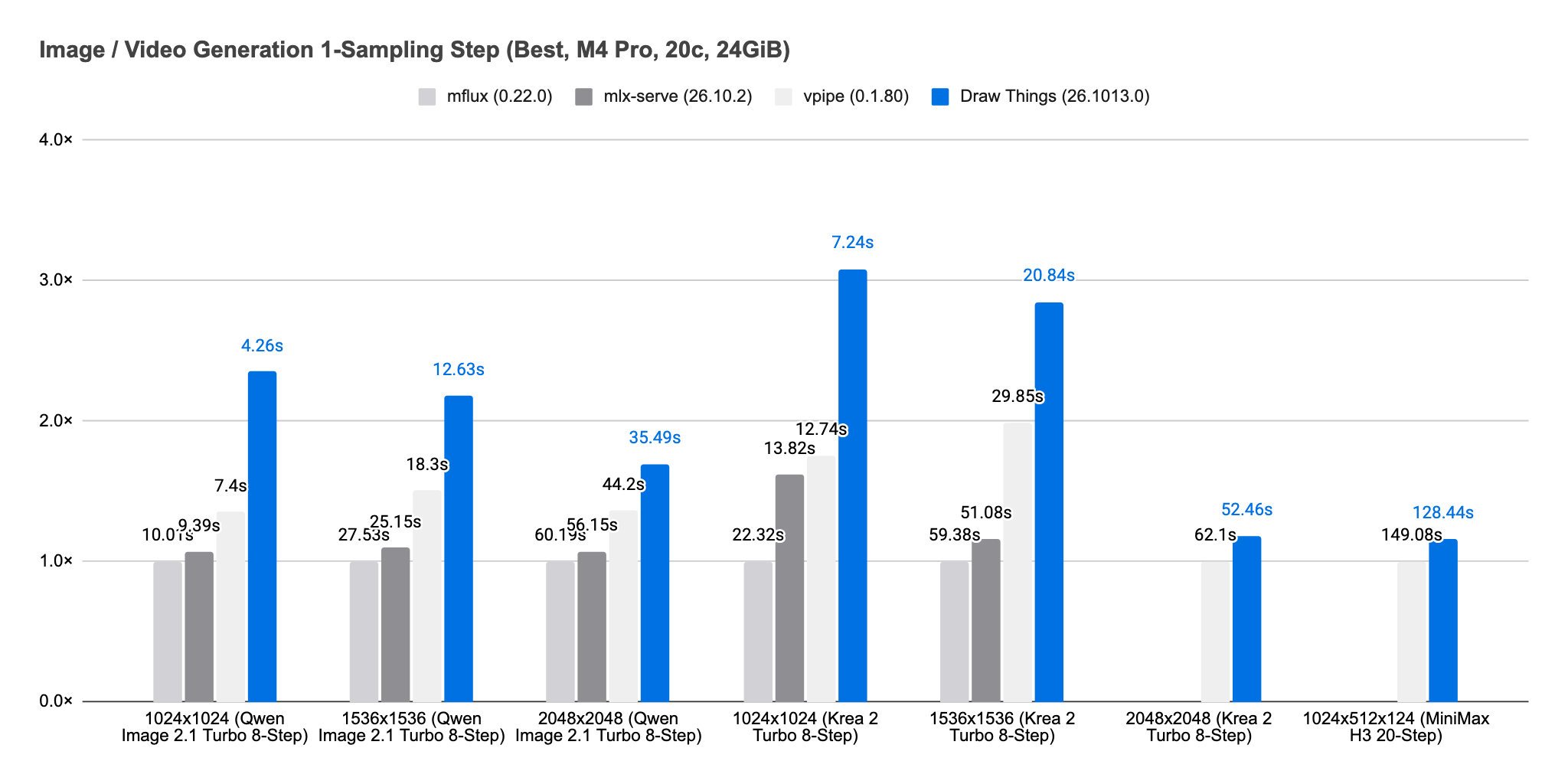
On this particular device, Draw Things is 1.14× to 1.97× as fast as the fastest competing inference engine.
M5 Ultra
On M5 Ultra (80c, 256GiB), Draw Things automatically uses GPU neural accelerators only.
We searched for the best configurations for mflux, mlx-serve, and vpipe, and arrived at the following:
mflux, Qwen Image 2.1 Turbo: BF16 weights, GPU only.
mflux, Krea 2 Turbo: Q8 weights, GPU only.
mlx-serve, Qwen Image 2.1 Turbo, 2048x2048: Q8 weights, GPU only.
mlx-serve, others: BF16 weights, GPU only.
vpipe: BF16 weights, dynamic Int8 GEMM, Sage Attention (Int8 QK, floating PV), GPU only.
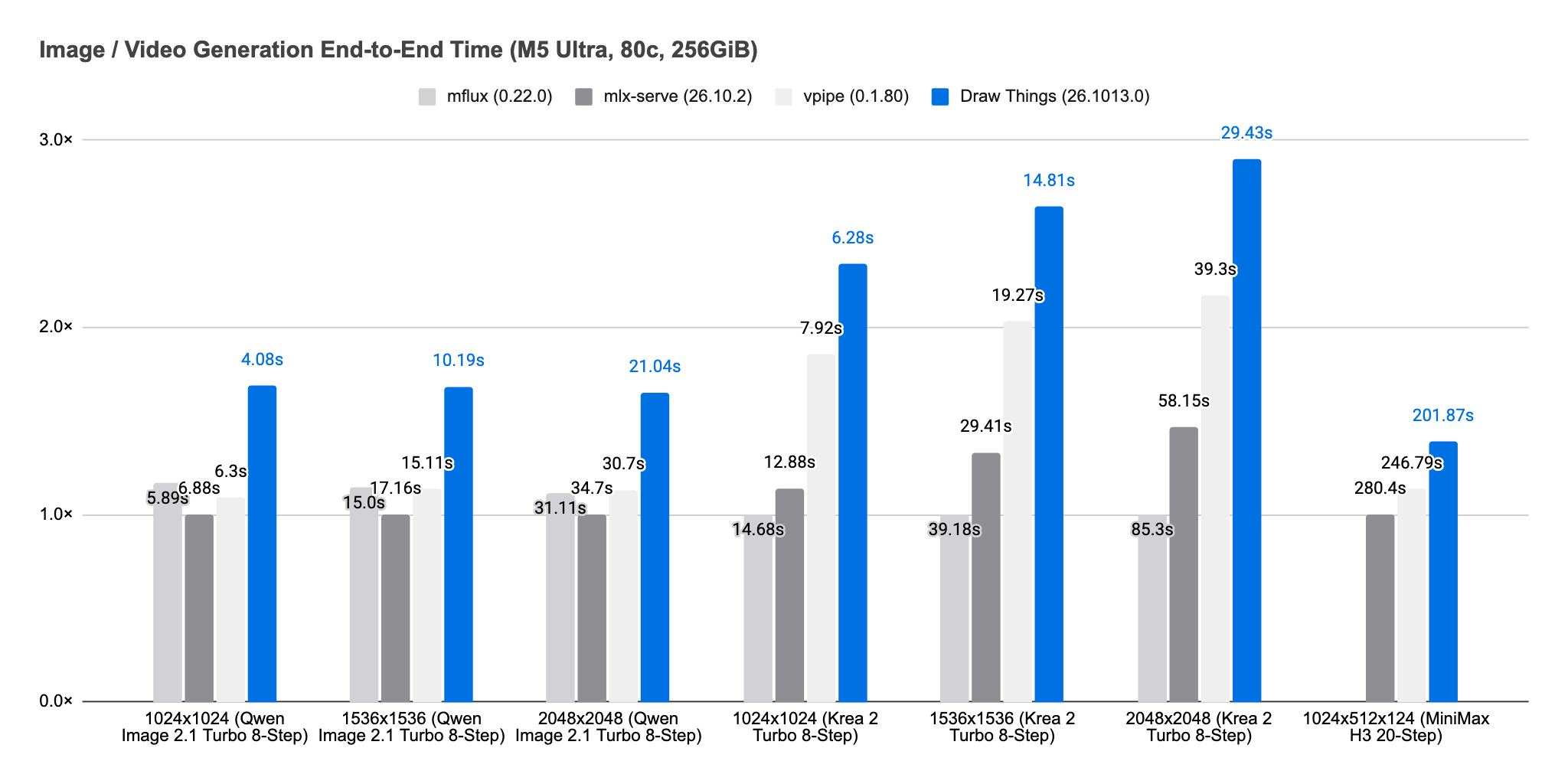
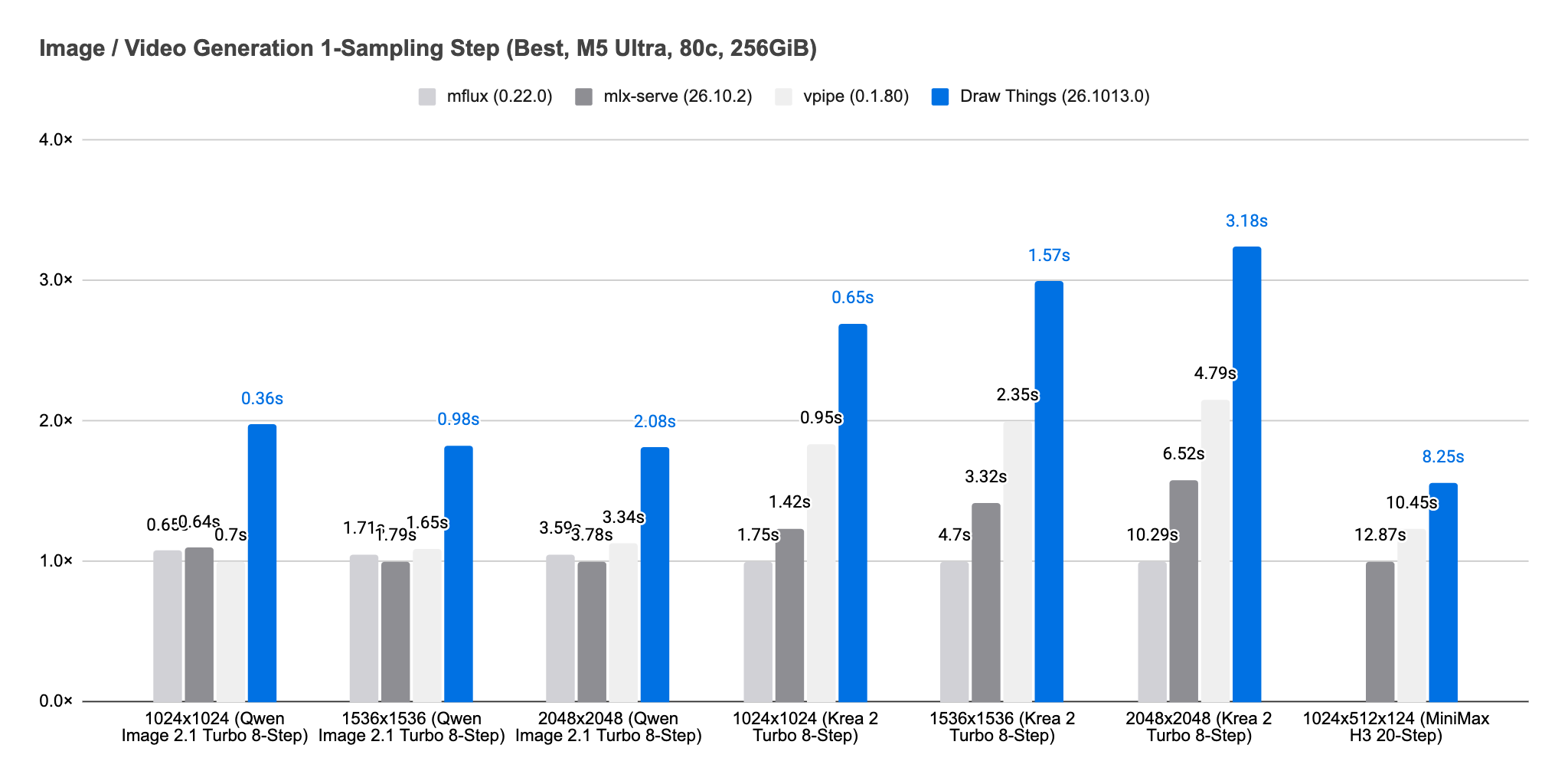
On this particular device, Draw Things is 1.22× to 1.44× as fast as the fastest competing inference engine.
M6
On M6 (32GiB), we found that Draw Things performs best when we manually enable the Apple Neural Engine. We also manually disabled high-resolution preview, which competes for access to the Apple Neural Engine.
For Draw Things, we used the 4-bit S variants for all models.
We searched for the best configurations for mflux, mlx-serve, and vpipe, and arrived at the following:
mflux: Q4 weights, GPU only.
mlx-serve, Qwen Image 2.1 Turbo: Q4 weights, GPU only.
mlx-serve, others: Q4 weights, ANE + GPU split, Krea 2 Turbo at 65% / 35%, MiniMax H3 at 15% / 85%.
vpipe, Qwen Image 2.1 Turbo: Q4 weights, dynamic Int8 GEMM, Sage Attention (Int8 QK, floating PV), ANE + GPU automatic split.
vpipe, Krea 2 Turbo, 1024x1024: Q8 weights, dynamic Int8 GEMM, Sage Attention, GPU only.
vpipe, Krea 2 Turbo, 1536x1536: Q4 weights, dynamic Int8 GEMM, Sage Attention, ANE + GPU.
vpipe, Krea 2 Turbo, 2048x2048: Q8 weights, dynamic Int8 GEMM, Sage Attention, ANE + GPU.
vpipe, MiniMax H3: Q8 weights, dynamic Int8 GEMM, Sage Attention (Int8 QK, floating PV), ANE + GPU.
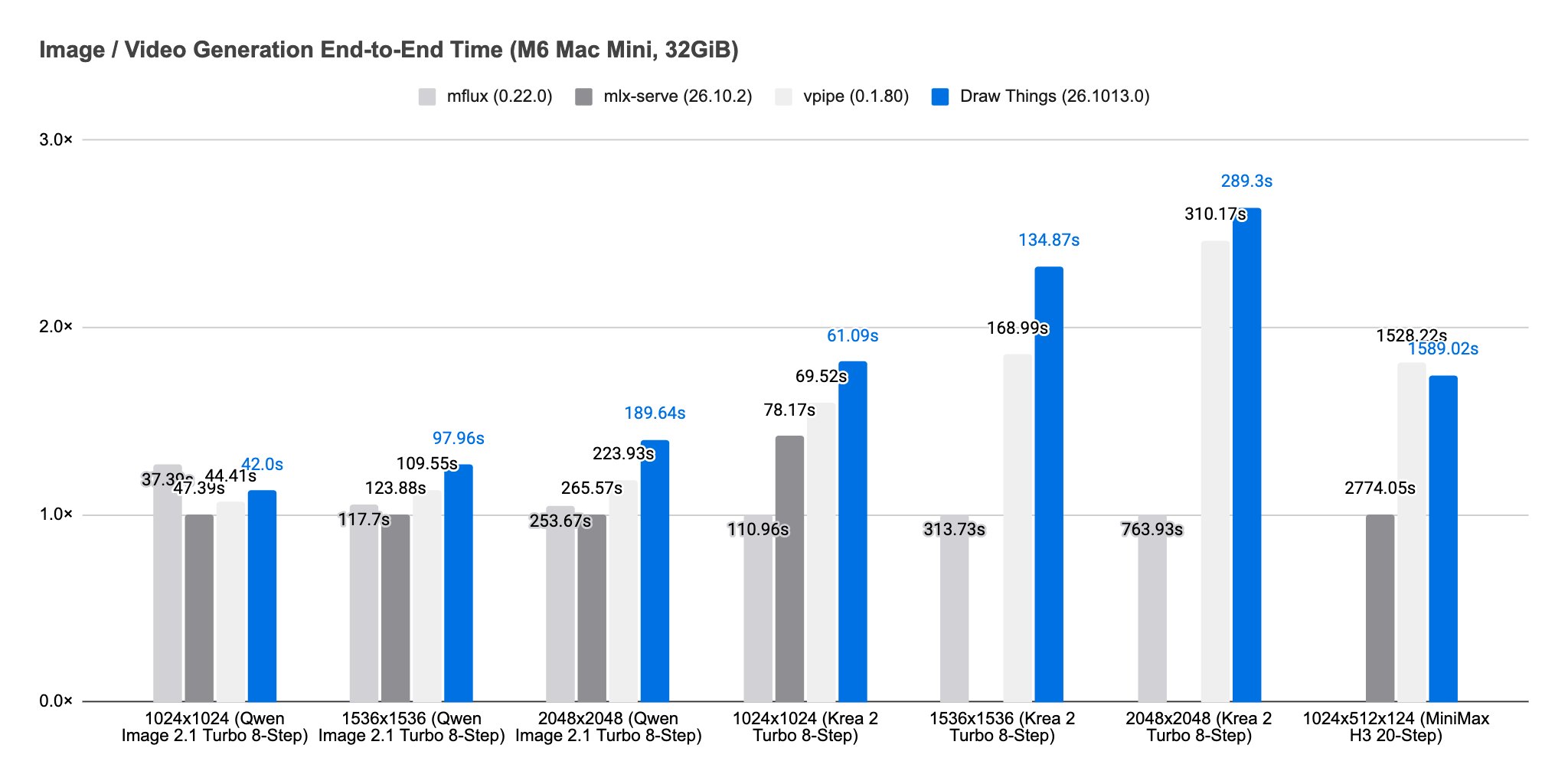
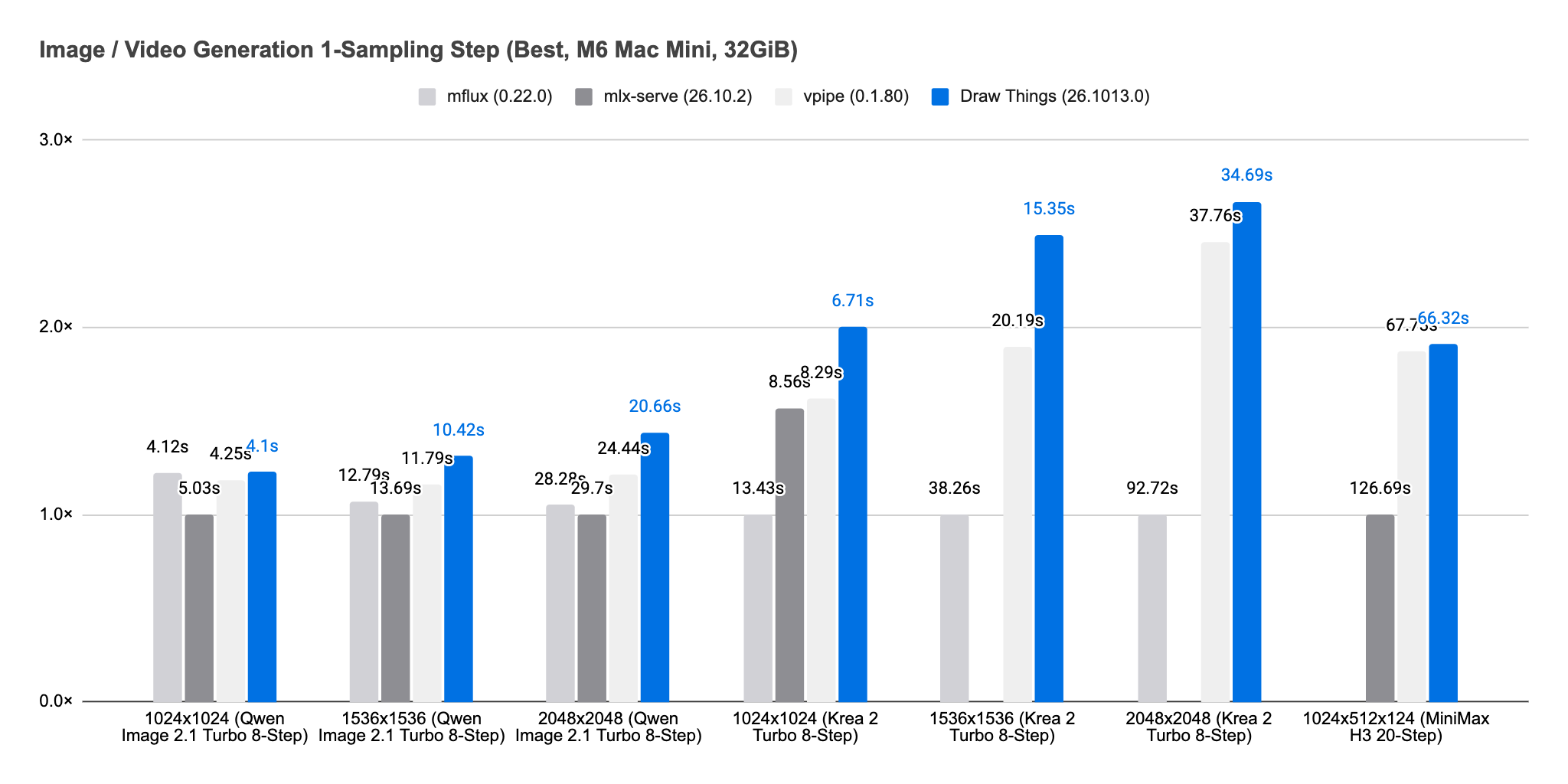
On this particular device, Draw Things runs at 0.89× to 1.25× the speed of the fastest competing inference engine, depending on the workload.
These results also highlight the generational leap in Apple Silicon. On our tested configurations, M5 Ultra is 5.87× to 6.74× faster than M3 Ultra end-to-end, and 5.26× to 5.85× faster when normalized by GPU core count and inference steps. The base M6 is 1.06× to 1.58× faster than the M4 Pro Mac mini end-to-end, delivering 1.12× to 1.86× better performance per dollar.
Fast is a Promise
Being fast does not mean that, at any given moment, Draw Things will always provide the fastest experience on Apple Silicon.
It is a promise, similar to Lowe’s “Lowest Price Guarantee”: if you find a specific configuration where we are slower, we will help figure out how to make Draw Things on par or faster.
Eventually, everything will converge, and every inference engine will reach the same level of performance, and we will all be very happy.